![OrangeLogo_1500x1500-01 1.png]](https://4061062.hs-sites.com/hs-fs/hubfs/OrangeLogo_1500x1500-01%201.png?height=40&name=OrangeLogo_1500x1500-01%201.png)
Step 1-Install the App
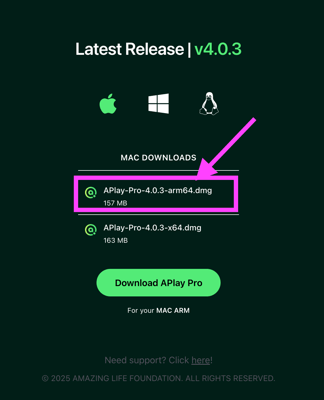
We recommend using the Chrome browser to download APlay Pro here https://www.joinamazing.com/downloads.
Safari NOTE: If you have a newer Mac with an M-chip (i.e. M1, M2, M3, etc.) you will need to manually select the option for the "arm64" download.
Step 2 - Setup your Primary Output
Step 3 - Login to APlay
Step 4 - Organize Your Folders
Step 5 - Create a Show
Step 6 - Edit Your Slide Flow
Step 7 - Duplicate & Replace